

Most exports are best left in [Auto] mode. [Auto] uses the clips' resolution, frame rate, and bitrate to choose export settings that balance file size and quality. When [Auto] is selected, you can also use [Export Audio Only] and [HDR].
Switch to [Manual] when you need to choose the export settings yourself.
Resolution
In [Manual] mode, choose an export resolution from the options below. Matching the export resolution to the original clip's resolution is recommended. Export using high resolution for clips that are in low-resolution does not improve its quality.
| Resolution | Description |
|---|---|
| 480p | Standard-definition video |
| 720p | HD video |
| 1080p | Full HD video |
| 2.7K | 2.7K video |
| 4K | Ultra HD video |
FPS(Smoothness)
In [Manual] mode, choose an export frame rate from the options below. Matching the export frame rate to the original video's frame rate is recommended. Upscaling a low-frame-rate video may not significantly improve its smoothness.
| FPS | Standard | Common regions and content |
|---|---|---|
| 24 | Film | Common worldwide for films, cinematic content, and narrative video |
| 25 | PAL | Europe, Asia, Africa, and Oceania; broadcast television and PAL-based video |
| 30 | NTSC | North America, Japan, and parts of South America and Asia; television, web video, and general-purpose content |
| 50 | PAL | Europe, Asia, Africa, and Oceania; sports, live events, and other smooth-motion content |
| 60 | NTSC | North America, Japan, and other regions; sports, gaming, action, and other smooth-motion content |
HDR
HDR (High Dynamic Range) preserves a wider range of brightness and color than SDR (Standard Dynamic Range), allowing bright areas, dark areas, and colors to appear with more detail.
Turn on [HDR] when all clips in the project were shot in HDR. If [HDR] is off while some clips are HDR, those clips are automatically tone mapped to SDR for better uniformity across the exported video.
Note: Turning on [HDR] does not add HDR information to clips that were not shot in HDR. It may also cause colors to shift, so it is not recommended when the source clips are not HDR.
Export Audio Only
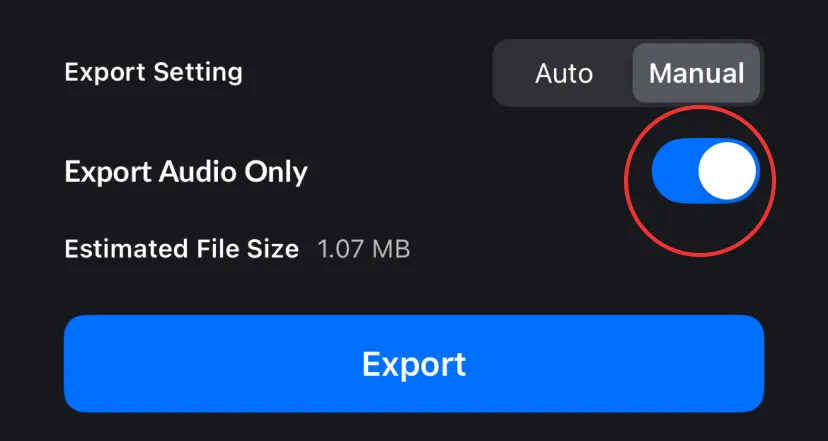
The [Export Audio Only] feature allows users to extract audio from a video without exporting the image.
1. Tap [Export] at the top right corner of the editor.

2. Turn on the [Export Audio Only] switch and tap [Export] to finish.
Average Bitrate
Bitrate is the amount of video data used per second, measured in megabits per second (Mbps). A higher bitrate can preserve more detail and improve quality, but it also creates a larger file. A lower bitrate creates a smaller file, but may reduce image quality.
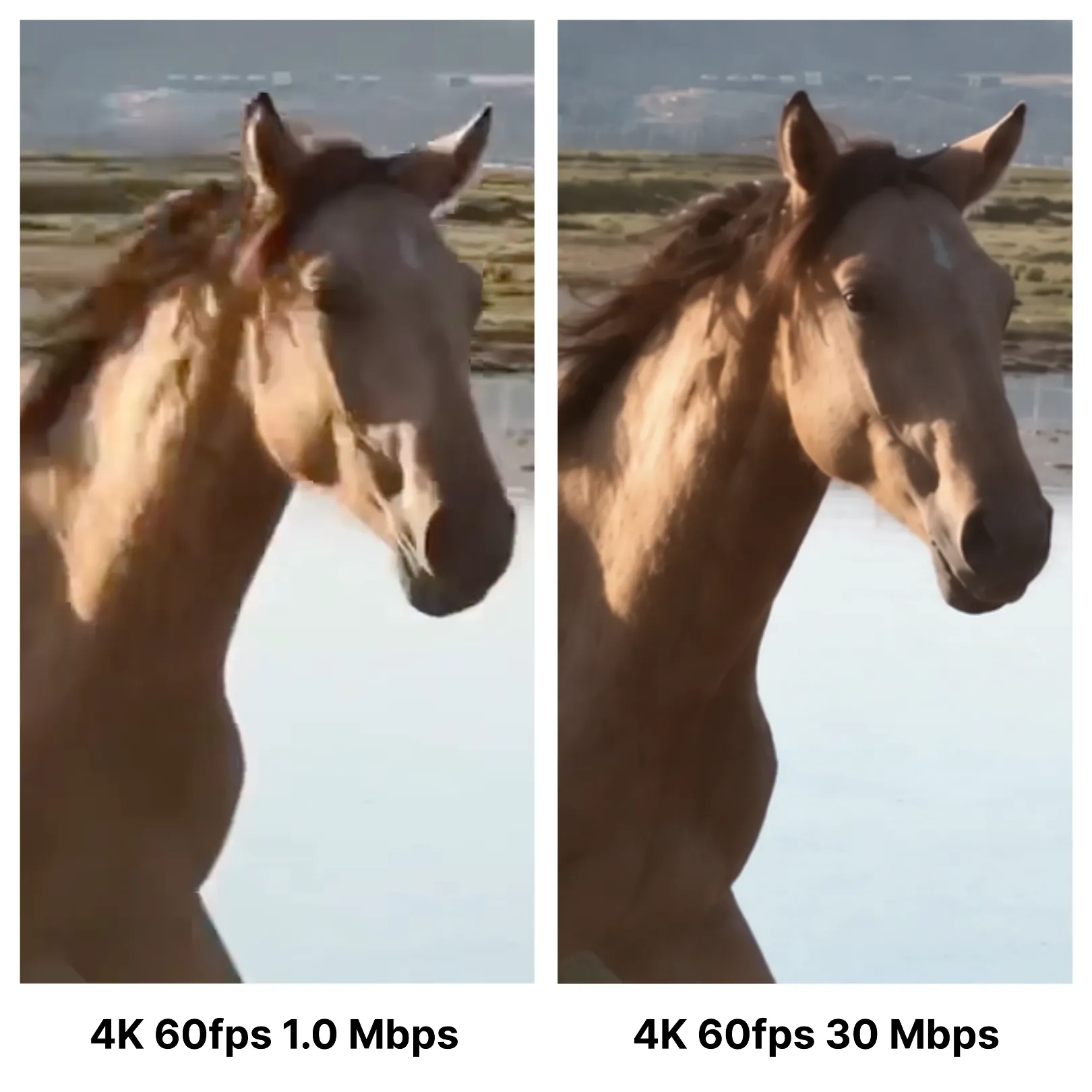
In [Manual] mode, you can set the average bitrate from 1.0 Mbps to 300 Mbps. The appropriate value depends on the video's resolution, frame rate, [HDR] setting, and the amount of visual detail.
When you change the resolution, FPS, or [HDR] setting in [Manual] mode, the average bitrate is automatically adjusted based on the original video clips' average bitrate.