


You can add short sound effects to an audio track to emphasize actions, improve transitions, or add atmosphere to your video.
Add a sound effect
1. Open a project in VN and move the playhead to the point where you want to add the sound effect.
2. Tap the [Music and audio] button on the left side of the timeline.
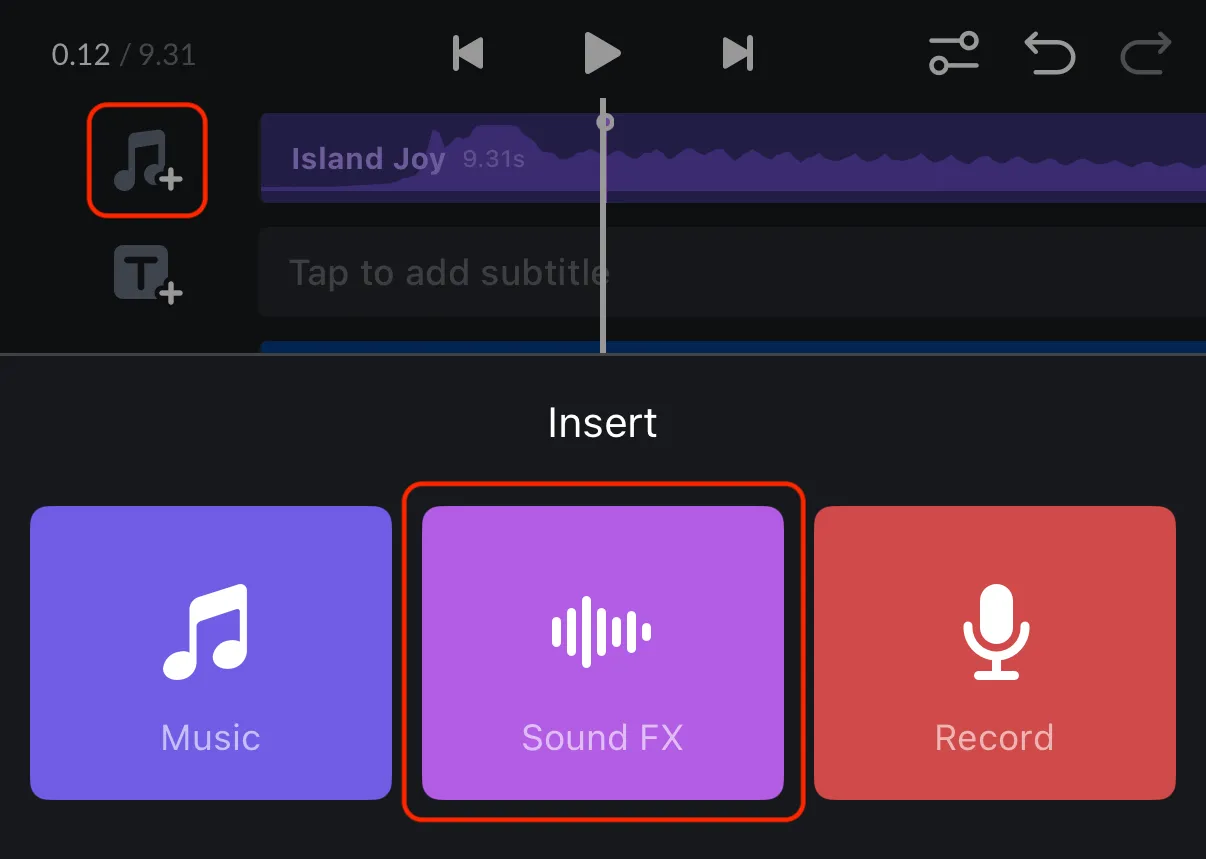
3. In the Insert menu, tap [Sound FX], open a category to find a suitable sound.
6. Preview a sound effect, then tap [Use] to add it to the audio track at the playhead position.
6. You can also press the [Star] button to favorite it. You can later find that particular sound effect quickly in the Favorite page.
Import a sound effect
The step is generally the same as importing music by heading to the [Yours] tab. Detailed instruction can be found in Import Music & Audio.
Choose a sound-effect category
Sound effects are grouped by the type of sound they contain. Choose a category based on the action, mood, or setting you want to support.
| Category | Description |
|---|---|
| Cartoon | Playful, exaggerated, and comic sounds for animated or humorous moments. |
| Fast Swish | Quick whooshes and air-sweep sounds for rapid movement or reveals. |
| Funny | Comedic sounds for jokes, reactions, and lighthearted scenes. |
| Machine | Mechanical, electronic, and device-related sounds. |
| Ringing | Telephone rings, notification tones, bells, and similar ringing sounds. |
| Vehicles | Sounds from cars, trains, aircraft, and other vehicles. |
| Weather | Thunder, lightning, rain, wind, and other weather-related sounds. |
| Variety Show | Audience reactions, stage-style effects, and entertainment-show sounds. |
| Vlog | Everyday ambience and accents suited to vlogs and casual videos. |
| Physical | Knocks, impacts, hits, and other sounds caused by physical actions. |
| Transitions | Swipes, rises, drops, and other effects that help connect scenes. |
| Cues | Attention-getting signals, announcements, and directional prompts. |
| Game | Level-ups, bonuses, game over sounds, impacts, explosions, coins, and power-ups. |
| Emotion | Sounds that reinforce excitement, surprise, tension, happiness, or other feelings. |
Tip: Use sound effects selectively and keep their volume balanced with dialogue and background music so they support the video without becoming distracting.