
What is a mask?
A mask controls which part of a video, photo, sticker, or other layer is visible. The masked area is revealed while the rest of the material is hidden, allowing you to combine layers without permanently cropping or deleting the original material.
Masks are useful for:
- revealing a second clip through a shape;
- creating split-screen and picture-in-picture layouts;
- highlighting a subject or detail;
- making circular, geometric, or soft-edged transitions; and
- combining a foreground layer with the layers underneath it.
The mask affects only the selected material. It does not change the original media file, and you can continue to adjust the mask after applying it.
Add a mask
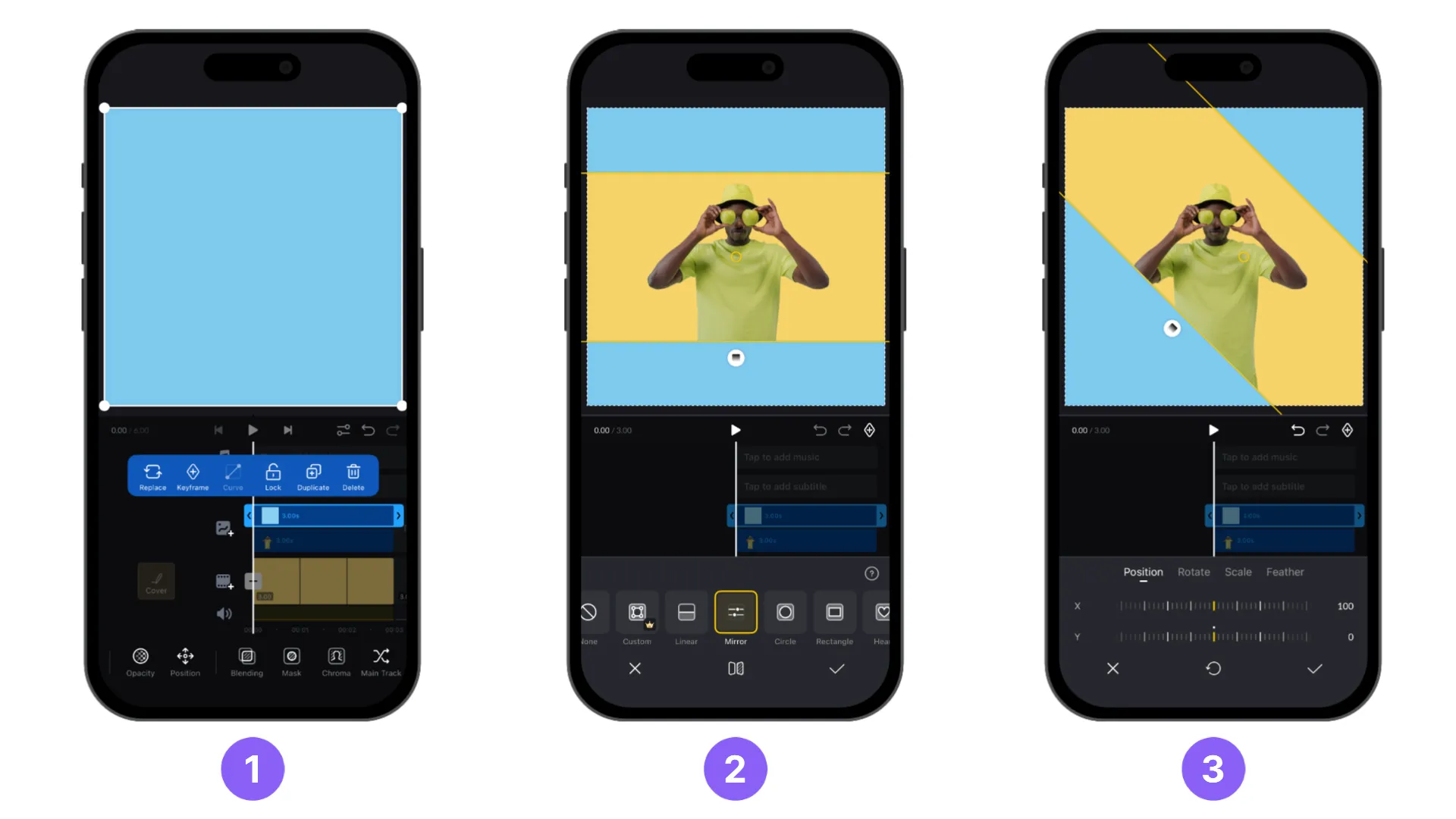
Select a material on the timeline, then tap [Mask].
Select a preset mask. The selected shape appears on the canvas.
Drag the mask to position it over the part of the material you want to show. Use the available controls to resize, rotate, soften, or reverse it.
Use preset masks
VN includes preset masks for common layouts and creative effects. Choose a preset based on the shape and visual style you want to create.
| Preset mask | Description |
|---|---|
| [Linear] | A straight diagonal edge that divides the frame into two areas. |
| [Mirror] | Two parallel edges that create a narrow central division. |
| [Circle] | A round mask for circular picture-in-picture windows and spotlight effects. |
| [Rectangle] | A rectangular frame with adjustable corner rounding. |
| [Heart] | A heart-shaped mask with a pointed bottom and curved lobes. |
| [Star] | A five-point star with sharp, angular points. |
| [Triangle] | A three-sided mask with straight edges. |
| [Triangle 2] | A rounded triangular mask with curved sides and a soft point. |
| [Pentagon] | A five-sided geometric mask. |
| [Octagon] | An eight-sided geometric mask. |
| [Octagram] | An eight-pointed geometric mask with four long and four short points. |
| [Hexagram] | A six-pointed star with broad, angular points. |
| [Flower] | A rounded flower shape with six broad petals. |
| [Cloud] | A cloud-shaped mask with a flat base and rounded bumps. |
| [Drop] | A teardrop shape with a pointed top and rounded bottom. |
| [Bookmark] | A rectangular bookmark shape with a V-shaped notch at the bottom. |
| [Vase] | A vase or bottle shape with a narrow top and rounded sides. |
| [Arch] | A rectangular mask with a rounded arch across the top. |
| [Flower 2] | A rectangular mask with repeated rounded scallops along each edge. |
| [12-Point Star] | A star with twelve narrow, pointed rays. |
| [Burst] | An irregular starburst with many sharp points of varying lengths. |
| [4-Point Star] | A four-point sparkle shape with curved sides. |
| [Cookie] | A rounded rectangular mask with repeated rounded scallops along each edge. |
| [Hourglass] | A symmetrical shape that narrows at the center and widens at the top and bottom. |
Use the matrix below as a quick reference for the settings available for each preset.
| Preset mask | [Position] | [Rotate] | [Scale] | [Feather] | [Round Corners] | [Reverse] |
|---|---|---|---|---|---|---|
| [Linear] | ✓ | ✓ | — | ✓ | — | ✓ |
| [Rectangle] | ✓ | ✓ | ✓ | ✓ | ✓ | ✓ |
| All other presets | ✓ | ✓ | ✓ | ✓ | — | ✓ |
For a shape that does not match the presets, use Custom mask.
Animate a mask with keyframes
You can combine a mask with keyframes to animate its position, size, rotation, feather, or custom points over time. Move the playhead to the start of the animation, add a keyframe, adjust the mask, then move the playhead and adjust it again to create the next keyframe.
Create a custom mask
Note: [Custom] mask requires VN Pro subscription.
A custom mask lets you draw and refine an outline around a subject, object, or irregular area instead of using a preset shape. For instructions on adding points, moving the mask or its material, and adjusting custom mask settings, see Custom mask.