
How to Use Seedance 2.0 Fast

Learn how to use Seedance 2.0 Fast in VN for quicker video generation, reference-driven scenes, and rapid creative iteration.

Seedance 2.0 Fast is the quicker-generation variant in the Seedance 2.0 family. It retains the family’s expressive video creation while prioritizing turnaround, making it useful when exploring a concept or revising a creative direction.

Seedance 2.0 Fast strengths

Strength What it offers Example use
Quicker turnaround Supports faster exploration of prompt variations, camera directions, and motion ideas. Compare alternate scene beats or visual directions while shaping a concept.
Expressive motion and direction Retains the Seedance family’s focus on action, subject behavior, and camera intent. Explore how a clearly described action or camera move could look.
Iteration-friendly generation Makes it practical to try variations before choosing a final creative direction. Refine the movement or visual approach through successive versions.

Video models are available in AI Edit and in related functions on the Kits page. Availability may vary by feature.

Frequently Asked Questions

Learn how to use Seedance 2.0 Fast in VN for quicker video generation, reference-driven scenes, and rapid creative iteration.

Seedance 2.0 Fast is best suited to faster-turnaround video creation and iteration, including testing prompts, motion, camera direction, and reference-driven concepts.

Choose Fast when turnaround is a priority and you want to iterate on a video idea, refine the prompt, or preview the intended motion. When the final deliverable calls for the strongest detail or native 4K output, compare with Seedance 2.0 and check the controls available for that model in VN.

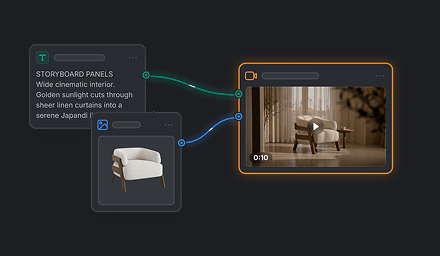
Use the reference modes and input types shown for the selected mode in VN. In your prompt, explain what each reference should contribute to the scene.

Describe the subject and main action first, then the setting and one clear camera direction. Add timing, sound, and reference roles only when they affect the result.

Fast is positioned for quicker turnaround, so it is a practical choice for exploration and revision. For a final clip where maximum detail or native 4K is central, compare its output with Seedance 2.0. As with other generative video, complex motion, small details, exact timing, and audio alignment may need refinement.