

Video Transition
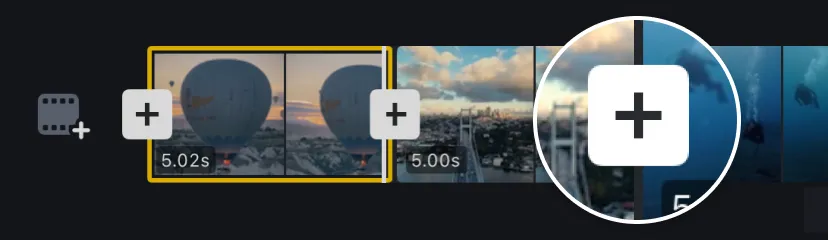
1. Add at least two video clips to the main track, or split a clip in two. Then tap the [+] between the clip thumbnails.
2. Choose a category—Basic, Matte, or Effects—and select a transition.
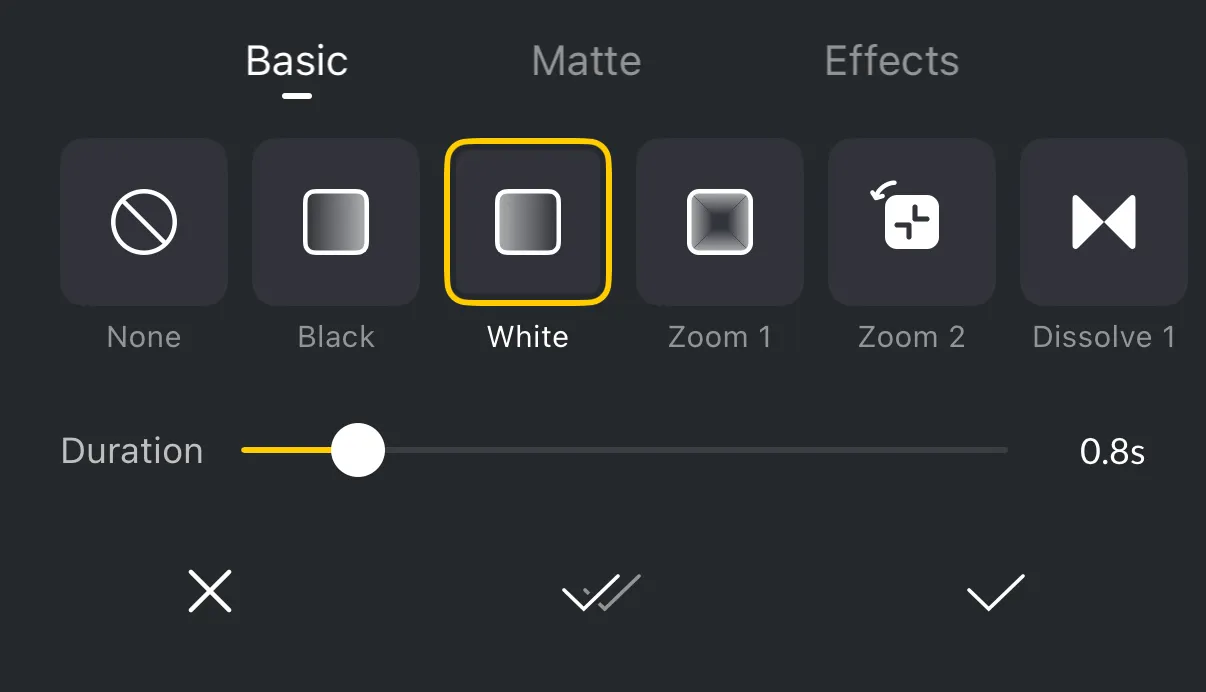
3. Adjust the Duration slider, then tap the checkmark to apply the transition.
Transitions are currently available only for clips on the main track. A transition can be added at the beginning, between clips, or at the end, but the available categories depend on the footage around that position.
Transition Categories
The transition picker includes three categories. Basic transitions are built-in transitions. Matte transitions use a matte image or animation to reveal the next clip. Effects transitions use AI to create a more customized transition.
Basic
| Name | Description |
|---|---|
| Black | Changes clips through a black screen. |
| White | Changes clips through a white screen. |
| Zoom 1 | Uses a soft, square-framed zoom through the clip change. |
| Zoom 2 | Uses a tunnel-like zoom toward the center of the frame. |
| Dissolve 1 | Uses a centered bow-tie-shaped dissolve between clips. |
| Dissolve 2 | Uses a wavy, warped dissolve between clips. |
| Shake 1 | Uses a block-like shake with overlapping square shapes. |
| Shake 2 | Uses a horizontal banded shake during the clip change. |
| Light | Uses a bright flash to change clips. |
| Blur | Blurs the image during the clip change. |
| Pixelate | Changes clips through a pixelated pattern. |
| Circle | Reveals the next clip through a circular opening. |
| Push | Pushes one clip away as the next clip enters. |
| Rotate 1 | Uses a horizontal rotating wipe as the next clip appears. |
| Rotate 2 | Uses a diagonal rotating wipe as the next clip appears. |
| Slide | Slides the next clip into the frame. |
| Wipe | Wipes across the image to reveal the next clip. |
| Blink | Uses a quick blinking change between clips. |
| Vertical | Splits or closes the image vertically during the change. |
| Horizontal | Splits or closes the image horizontally during the change. |
Matte
| Name | Description |
|---|---|
| Circle 1 | Uses a clean circular matte opening to reveal the next clip. |
| Circle 2 | Uses a warped circular matte opening to reveal the next clip. |
| Line 1 | Uses a broad, warped line matte to reveal the next clip. |
| Line 2 | Uses a narrow vertical line matte to reveal the next clip. |
| Line 3 | Uses a soft full-frame line matte to reveal the next clip. |
| Hexagon | Reveals the next clip through a hexagonal matte. |
| Square 1 | Uses a centered square matte to reveal the next clip. |
| Square 2 | Uses a second geometric square matte reveal. |
| Square 3 | Uses a broad square matte reveal with a different texture. |
| Ink 1 | Uses a compact ink spreading matte to reveal the next clip. |
| Ink 2 | Uses a broader, more fluid ink spreading matte. |
| Paint 1 | Uses a soft paint-stroke matte to reveal the next clip. |
| Paint 2 | Uses a broader paint-stroke matte with a different spread. |
| Sea | Uses a flowing sea-like matte pattern. |
| Swirl | Uses a swirling matte pattern. |
| Zebra | Uses a striped matte pattern. |
| Memory | Uses a textured memory-like matte pattern. |
| Lens | Uses a textured lens-like matte pattern. |
| Glitch | Uses a glitch-textured matte pattern. |
Effects
| Name | Description |
|---|---|
| Custom | Generates a transition from the selected start and end frames and your description. |
| Zoom In | Zooms into the next clip. |
| Zoom Out | Pulls the view back into the next clip. |
| Push | Pushes the next clip into the frame. |
| Pull | Pulls the next clip into the frame. |
| Fly Through | Moves rapidly through the scene change. |
| 3D Orbit | Orbits around the footage in a 3D motion. |
| Smart Move | Uses a subject-focused movement between clips. |
| Style Morph | Morphs the visual style between clips. |
| Money Veil | Uses a falling-money overlay during the change. |
| Slide Left | Slides the next clip in from the left. |
| Slide Right | Slides the next clip in from the right. |
| Confetti | Uses a confetti burst during the change. |
| Gold Confetti | Uses a gold confetti burst during the change. |
| Rise | Moves upward into the next clip. |
| Dive | Dives downward into the next clip. |
| Smoke Drift | Uses drifting smoke during the change. |
For Custom, select the start and end frame, then provide a detailed description of the transition you want to create. Custom transitions also show their duration, credit cost, and remaining balance in the transition panel.
Note: Effects transitions use AI and require credits; the transition panel shows the credit cost and your remaining balance, learn more about Credits. The selected frame is uploaded to the cloud for processing and deleted once processing is complete. .
Transition Availability
| Category | Beginning of project | In between clips | End of project |
|---|---|---|---|
| Basic | ✓ | ✓ | ✓ |
| Matte | ✕ | ✓ | ✕ |
| Effects | ✕ | ✓ | ✓ |
✓ Available · ✕ Not available
Matte transitions are unavailable at the beginning because they require previous footage and unavailable at the end because they require later footage. Effects transitions are unavailable at the beginning because they require previous footage.
Apply to All
Tap [Apply to all] to apply the selected transition to all clip boundaries on the same track.
